AI Series- Vector Databases: From Beginner to Pro
Part 1 of 4 in "Vector Databases: From Beginner to Pro."

The series
I am planning to start System Design for AI systems also but to understand that we need to understand vector DBs which are the real brain behind AI. This series break Vector DB learning into 4 parts as below.
Part 1 — Why Vector Databases? (The Problem Nobody Told You About) The class of problems traditional databases cannot solve, an intuitive explanation of embeddings, real-world examples (search, RAG, recommendations), and — importantly — when you don’t need a vector database.
Part 2 — Under the Hood: How Vector Databases Actually Work Distance metrics, the “curse” that makes brute force impossible at scale, and the clever indexes that save us: HNSW, IVF, and Product Quantization. Plus metadata filtering, sharding, and the recall/latency/memory triangle.
Part 3 — Show Me the Code: Vector Databases in Practice Hands-on Python across four popular databases — Chroma (local), pgvector (SQL-native), Qdrant (production), and Pinecone (managed) — ending with a complete Retrieval-Augmented Generation (RAG) pipeline.
Part 4 — Shipping It: Hosting, Scaling & Production Self-hosted vs. managed, capacity sizing math, index tuning, hybrid search, reranking, monitoring, backups, security, cost control, and the pitfalls that bite everyone once.
Who this is for
Beginners who keep hearing “embeddings” and “RAG” and want the real mental model, not buzzwords.
Backend/data engineers who need to actually build and run this stuff.
Anyone shipping LLM features who has realized the model is only half the story — retrieval is the other half.
No ML PhD required. If you can read a bit of Python and you’ve used a database before, you’re ready.
Let me start with a question that sounds simple and isn’t:
How would you build a search box that finds the right answer even when the user doesn’t use any of the same words as your documents?
Someone types “my laptop won’t turn on.” The perfect help article is titled “Troubleshooting a device that fails to boot.” Not a single word overlaps. power, boot, won't turn on, dead — humans know these are the same idea. Your database does not.
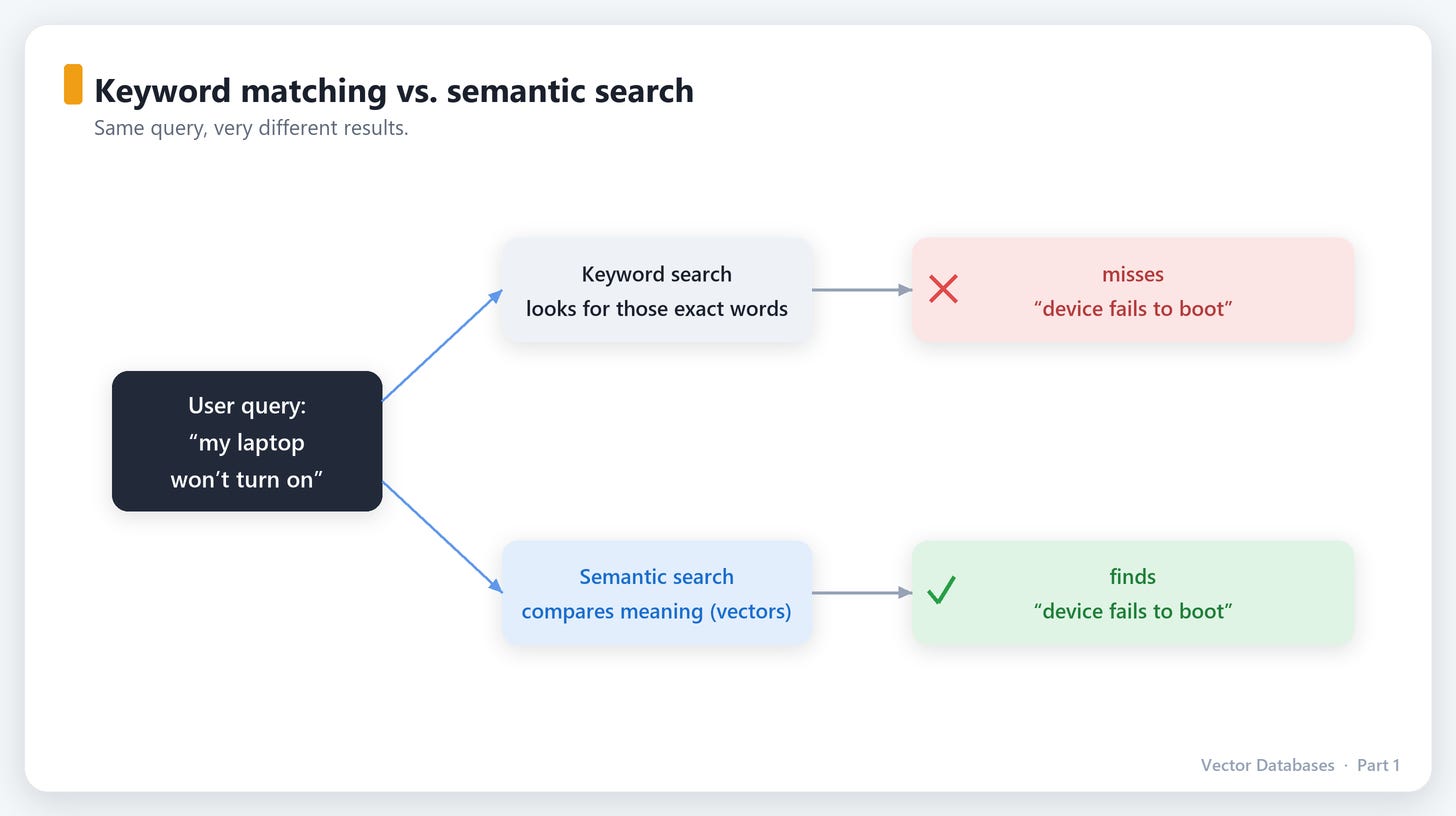
This is the problem. And once you see it, you’ll notice it everywhere. Vector databases exist to solve it. Let’s build up to why they’re the answer — starting from the tools you already know.
1. What traditional databases are brilliant at (and terrible at)
Relational databases (Postgres, MySQL) and document stores (MongoDB) are astonishingly good at one thing: exact and structured matching.
SELECT * FROM users WHERE email = 'ada@example.com';
SELECT * FROM orders WHERE total > 100 AND status = 'shipped';
Equality, ranges, sorting, joins — these are their home turf. Even full-text search (LIKE '%boot%', or a proper inverted index like Elasticsearch) is really just keyword matching, sometimes with clever stemming (running → run).
But keyword matching has a hard ceiling. It fundamentally does not understand meaning:
User searches forKeyword search findsWhat they actually wanted”car”documents with “car”also “automobile”, “vehicle”, “sedan”“how to reset my password”docs with those words”recover account access”“cheap flights to NYC”“cheap”, “flights”, “NYC”“budget airfare to New York”
The gap between the words people use and the meaning they intend is where traditional search falls apart. We need a way to search by meaning, not by spelling.
2. The key idea: turning meaning into coordinates
Here’s the conceptual leap that makes everything click.
What if we could place every piece of text (or image, or song) at a specific point in space, such that things with similar meaning end up close together?
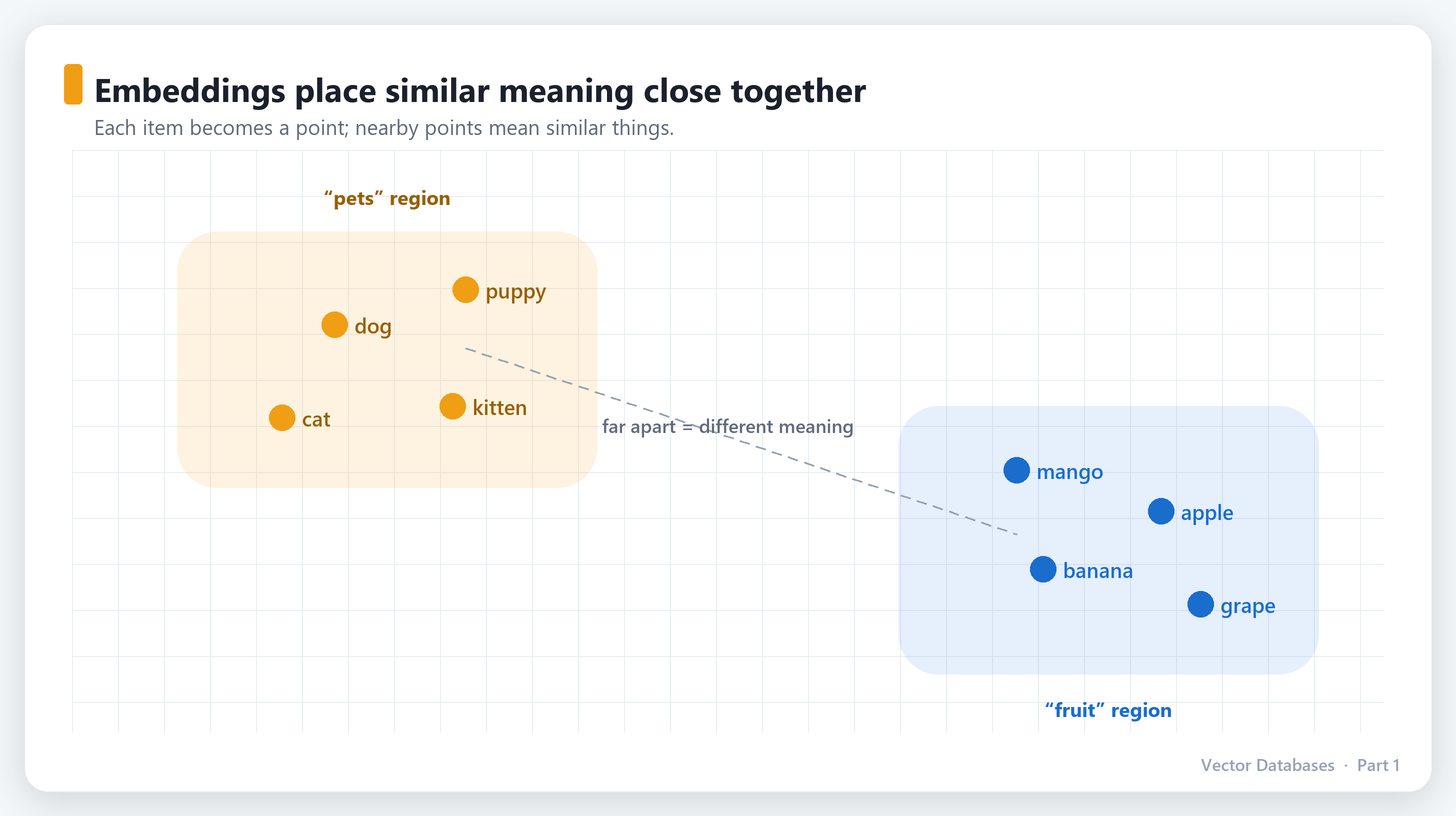
Imagine a giant map. On this map:
dogandpuppysit right next to each other.catis nearby (also a pet).kingandqueenare close.bananais way over on the other side of the map, nearfruitandsmoothie.
If you had this map, “search by meaning” becomes “find the nearest points.” Simple.
That map is real, and the coordinates have a name: embeddings.
Embeddings in one paragraph
An embedding is just a list of numbers (a vector) that represents the meaning of something. Instead of a 2D map with (x, y), real embeddings live in hundreds or thousands of dimensions — a typical model outputs vectors of length 384, 768, or 1536. You can’t picture 1536 dimensions, and that’s fine: the rule is the same as the 2D map. Similar meaning → nearby vectors. Different meaning → far-apart vectors.
"dog"    → [ 0.21, -0.98,  0.44, ... ]   (768 numbers)
"puppy"  → [ 0.19, -0.95,  0.41, ... ]   ← very close to "dog"
"banana" → [-0.77,  0.10,  0.88, ... ]   ← far from both
You don’t compute these numbers by hand. A neural network — an embedding model — was trained on enormous amounts of text and learned to place meaning in space. You hand it text, it hands you a vector. (In Part 3 you’ll call one in three lines of Python.)
The famous party trick
The classic demonstration that embeddings capture meaning, not just words:
vector("king") − vector("man") + vector("woman") ≈ vector("queen")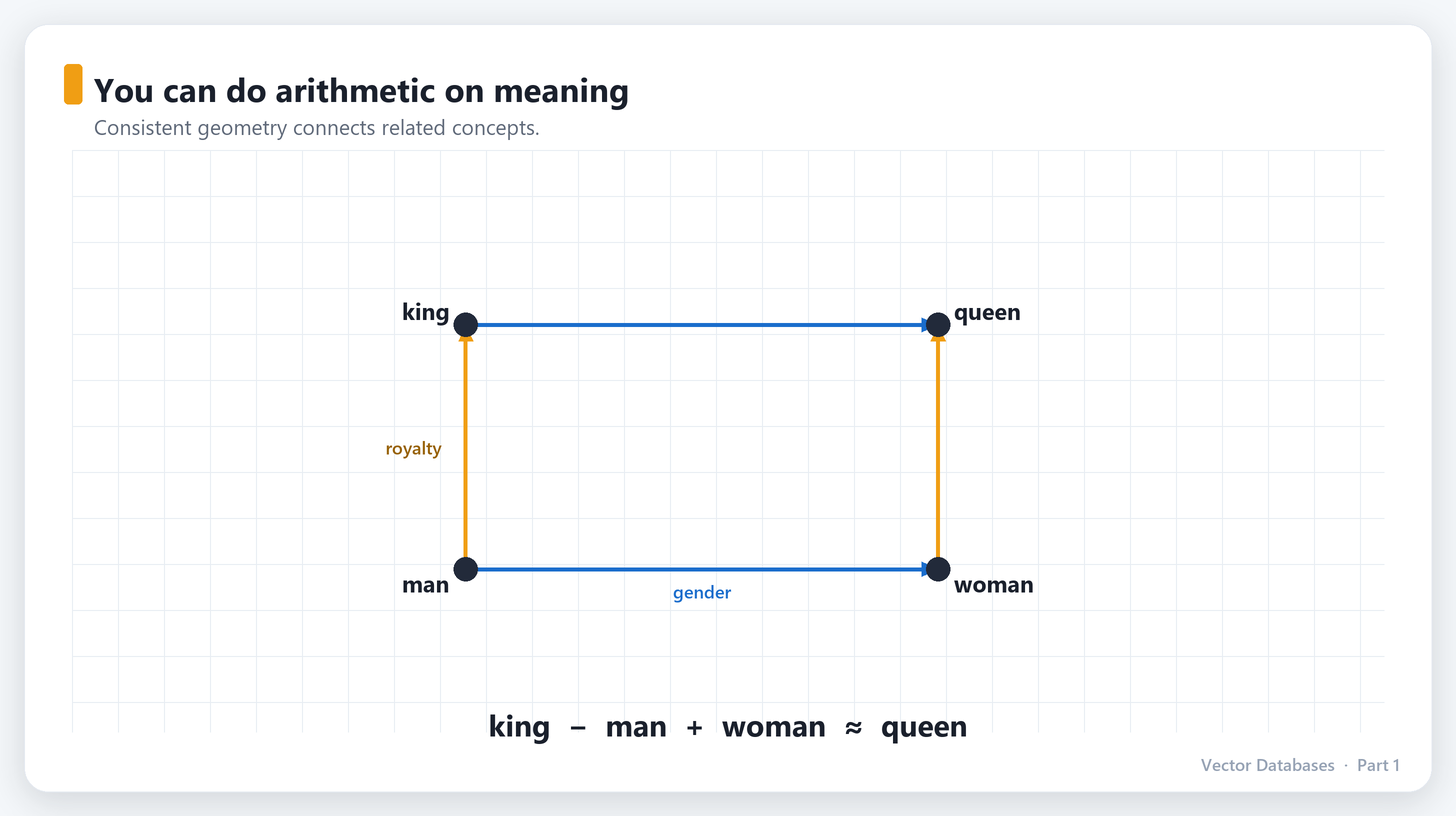
You can do arithmetic on meaning. “King, but female” lands you next to “queen.” This is not a coincidence or a gimmick — it’s a direct consequence of similar concepts being arranged with consistent geometry. When people say a model “understands” language, this map is a big part of what they mean.
3. So why not just store embeddings in a normal database?
Great instinct — and for a while, you actually can. An embedding is just an array of floats. Postgres can hold an array. So what’s the problem?
The problem is the question you ask of that data. With a normal database you ask “give me the row where id = 42.” With embeddings you ask something completely different:
“Give me the 10 vectors closest to this vector.”
This is called nearest neighbor search, and “closest” means geometric distance in that high-dimensional space. To answer it exactly, the naive approach is:
for every vector in the database:
    compute the distance to the query vector
sort them all
return the top 10
That’s brute force. And it works! ... until it doesn’t:
1,000 vectors? Instant. Honestly, just use a Python loop or NumPy.
1,000,000 vectors × 768 dims? Every single query multiplies out to ~768 million operations, per search, every time. Now do that for thousands of users per second.
100,000,000 vectors? Brute force is dead on arrival.
Comparing your query against every vector doesn’t scale. This is the real reason vector databases exist. They are built around two hard problems that ordinary databases were never designed for:
Approximate Nearest Neighbor (ANN) search — clever index structures (HNSW, IVF, PQ) that find the almost-certainly-closest vectors while looking at only a tiny fraction of them. You trade a sliver of accuracy for 100–1000× speed. (This is the heart of Part 2.)
Everything a real database needs around that — filtering by metadata (”closest vectors, but only in English, only from 2024”), updates and deletes, persistence, scaling across machines, and replication.
The one-sentence definition: A vector database is a system purpose-built to store embeddings and answer “what’s most similar to this?” — fast, at scale, with filtering — using approximate nearest neighbor indexes.
4. Where this shows up in the real world
Once you have “search by meaning,” a surprising number of products fall out of it. These aren’t hypotheticals — they’re what teams ship every day.
Semantic search
The example we opened with. Embed your documents once; embed the user’s query at search time; return the nearest documents. “Won’t turn on” finds “fails to boot.” Powers docs sites, e-commerce, internal knowledge bases.
RAG — the reason vector databases exploded in popularity
Large language models (ChatGPT, Claude, etc.) are brilliant but have two flaws: they don’t know your private/internal data, and they confidently make things up. Retrieval-Augmented Generation (RAG) fixes both:
1. User asks: "What's our refund policy for enterprise plans?"
2. Embed the question → search your vector DB of company docs
3. Retrieve the 5 most relevant policy chunks
4. Paste them into the prompt: "Using ONLY this context, answer: ..."
5. The LLM answers grounded in YOUR facts — with far less hallucination
Every “chat with your PDF / your docs / your codebase” product is RAG, and a vector database is the retrieval engine underneath. If you’re building anything with LLMs on private data, you will meet vector databases. This series ends by building a full RAG pipeline.
Recommendations
Embed users and items into the same space. “Customers like you” and “products like this” become nearest-neighbor queries. Spotify-style “more like this,” related products, similar articles.
Image, audio & video search
Embeddings aren’t just for text. Embed images and you get reverse image search and “find visually similar products.” Embed audio and you get Shazam-style matching. Multimodal models even put text and images in the same space, so you can search a photo library with the words “red bicycle in the rain.”
Deduplication & anomaly detection
Near-duplicate content clusters tightly in vector space (great for finding reposts or plagiarism). Conversely, a point that’s far from everything is an outlier — useful for fraud and anomaly detection.
Face recognition & biometrics
Every face becomes a vector; matching is a nearest-neighbor lookup against enrolled faces.
The pattern behind all of these: represent things as vectors, then let “similar = nearby” do the work.
5. When you do NOT need a vector database
This is the section most tutorials skip, and it’s the one that makes you look like a pro. A vector database is a real piece of infrastructure — don’t reach for one reflexively.
You probably don’t need a dedicated vector DB when:
Your data is small. Under, say, 100k–1M vectors, an in-memory library like FAISS or even plain NumPy is faster to set up and blazingly fast to query. No server to run.
You already run Postgres and your scale is modest. The
pgvectorextension adds vector search to the database you already operate, back up, and know how to secure. For many apps this is the right answer, not a compromise. (We cover it in Part 3.)Keyword search is genuinely enough. If users search by exact SKU, name, or ID, a plain index or full-text search is simpler and better. Meaning-based search is overkill.
You need exact, explainable matches. ANN is approximate by design. For “must never miss a legally-required record” use cases, exact matching semantics matter.
Reach for a purpose-built vector database when you have millions-plus vectors, need low-latency similarity search under real query load, want metadata filtering fused with similarity, and need it to scale, persist, and replicate like production infrastructure.
Rule of thumb: Start with
pgvectoror FAISS. Graduate to a dedicated vector database (Qdrant, Milvus, Pinecone, Weaviate…) when scale, latency, or operational needs actually demand it. “Boring and sufficient” beats “trendy and overkill.”
What’s next
You now have the mental model that everything else hangs on:
Traditional databases match words and exact values; vector databases match meaning.
Embeddings turn meaning into coordinates — similar things sit close together.
The core operation is nearest neighbor search, and doing it at scale is hard — which is the whole reason these systems exist.
They power semantic search, RAG, recommendations, image search, and more.
And you don’t always need one — start simple.
In Part 2, we open the hood. How does a database find the nearest vectors without checking all of them? We’ll build up the intuition for distance metrics and the index structures — HNSW, IVF, Product Quantization — that make billion-scale similarity search feel instant. Once you understand these, you’ll know exactly which knobs to turn when your search is too slow, too inaccurate, or too expensive.

Nice series
Good explanation 🔥🔥